
Rugged Wild
Conceptual Magazine Design
This conceptual magazine cover was designed as a professional example for my high school students, illustrating how to merge multiple photographic elements into a cohesive, magazine-quality layout using Adobe Photoshop and Illustrator. The goal was to teach both technical photo manipulation and story-driven composition.
The title text was built in Adobe Illustrator and textured in Photoshop.
Proceeding subheadings were carefully placed to balance the composition without obscuring key visual elements.
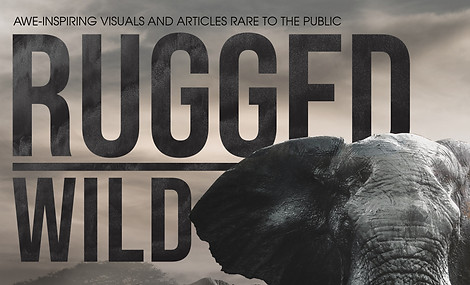

The bull elephant centerpiece was clipped, flipped and lighting and color was adjusted slightly to match the light source.
The original photo is by Geranimo and was downloaded from Unsplash.com.
I carefully masked around the tusks, ears, and trunk, refining the edges with the Pen and Brush Tools.

( Original )
( Original )

The final cover presents a dramatic and immersive wildlife scene, seamlessly blending multiple photographs into one cohesive artwork. It serves as both an example of digital compositing for my students and a showcase of how Photoshop tools - when used strategically - can tell powerful visual stories.

The theme, “Rugged Wild,” called for a bold, awe-inspiring aesthetic highlighting the power and majesty of wildlife. I selected several high-resolution photographs:
-
A frontal shot of a dominant bull elephant
-
A herd of elephants walking through a foggy landscape
-
A dramatic cloudy sky
-
Rugged terrain and muddy water foreground
Each image was chosen based on lighting consistency, perspective, and potential for blending into a believable scene.
Background & Atmospheric Depth
-
The base layer consists of the cloudy sky, adjusted using Curves and Color Balance for a moody tone.
-
The fog-covered elephants were masked and blended into the background using Layer Masks and the Soft Round Brush on low flow, creating atmospheric perspective (depth and mistiness).
-
I used Gaussian Blur slightly on the background elements to push them further back in visual space.
Foreground Integration
-
The large bull elephant was placed prominently in the foreground.
-
Shadows were manually painted using Multiply layers and a soft brush, matched to the lighting direction.
Ground & Water Elements
-
The muddy ground was added beneath the elephant using a composite of multiple textures.
-
I matched the lighting and shadows using Burn/Dodge tools, plus Hue/Saturation layers to ensure the tone matched the elephant’s feet.